
Catalog photos from a phone, without a studio
How a shop can turn a phone photo of clothes or a product into a catalog shot with InstantSnap, and what to photograph first.
A catalog photo used to mean a backdrop, a light, and a free afternoon. Most small shops do not have that setup. They have the product in hand and a phone. InstantSnap is built for that photo: you add it in Studio, describe the shot, and keep the result with the rest of the workspace.
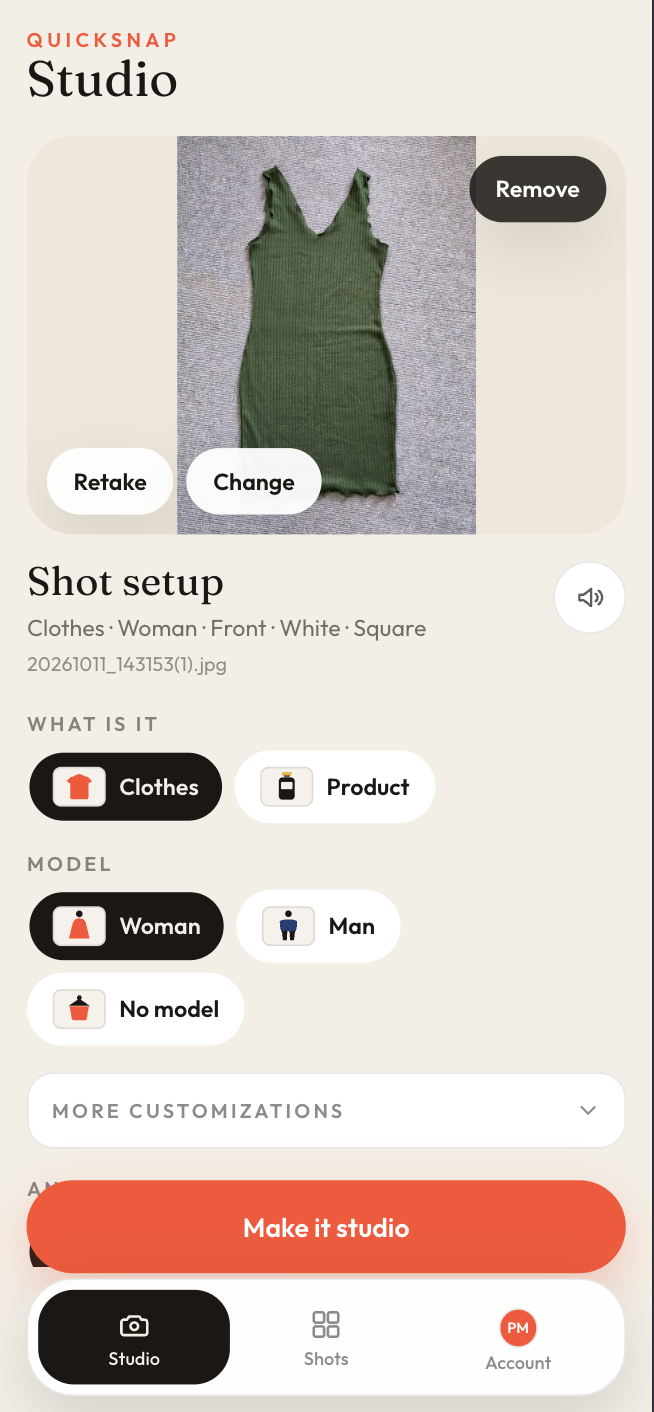
Start with a clear photo of the real item
The studio shot is only as faithful as the photo you give it. Fill the frame with the garment or the product. Keep the item in focus. A window, a table, or a shop floor is fine. InstantSnap is there to replace the messy room, not to invent a product you did not photograph.
- Photograph one item at a time so the shot has a single subject.
- Include the whole garment if you want it worn, or the whole product if you want it on a surface.
- Use Choose photo for a picture you already have, or Take photo when the item is in front of you.
- HEIC photos from an iPhone are converted in the studio before the shot is made.
Clothes and products are different shots
What is it is the first real choice. Clothes can go on a model. Product keeps the object alone, which is what you want for electronics, bottles, tools, and packaged goods. Mixing them up is the usual reason a shot feels wrong: a speaker does not need a model, and a shirt often does.
The finished photo lives in Shots
Make it studio sends the photo off. When it is ready, open it from Shots. You can compare it with the original phone photo, read the angle, color, background, and frame, and save the catalog photo to your device. The workspace keeps the shot so you are not hunting through a camera roll.
