
Angle, background, and frame for a store listing
How to choose an InstantSnap angle, background, and frame so a catalog photo fits a product page, a portrait, or a story.
Once the item is clear, the look decides where the photo can go. InstantSnap asks for three things: the angle of the subject, the background behind it, and the frame of the file. On a computer those sit on the Look tab. On a phone they follow the item choices as you scroll.
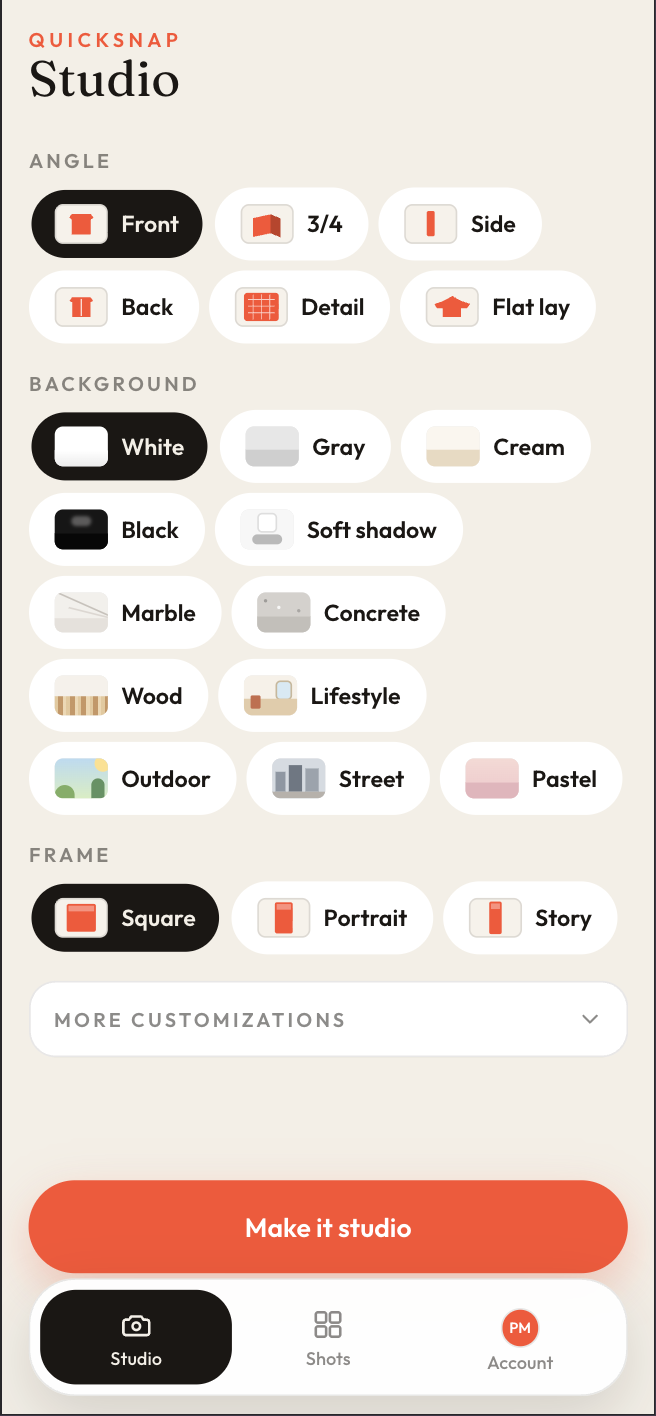
Angle tells the shopper what they are seeing
- Front is the straightforward listing photo.
- 3/4 shows depth, which helps boxes, bottles, and shoes.
- Side and Back are for products that change from those views, and for clothes with a print or a cut you need to show.
- Detail moves in on hardware, stitching, or a label.
- Flat lay puts the item down, which suits folded clothes and small goods.
Background should match the store, not fight it
White, Gray, Cream, Black, and Soft shadow are the quiet catalog backgrounds. Marble, Concrete, and Wood are surfaces. Lifestyle, Outdoor, Street, and Pastel are scenes. A white background is the safest default for a grid of products. Outdoor and Lifestyle are better when the listing is a single hero image.
Frame is the shape of the file
Square fits most product grids. Portrait fits a taller product page or a lookbook. Story is the tall frame for a full-screen placement. Pick the frame for the place the photo will actually be used. You can make another shot of the same phone photo in a second frame if the store needs both.
Color is separate from the background. Keep leaves the product color as photographed. The other color choices are there when a listing needs the item shown in a specific color.